Salesforce and Microsoft Announce Copilotforce: What Founders Need to Know
An engineering-first analysis of Copilotforce, its architecture, Agentforce integration, zero-copy data federation, security, availability, and practical implications for founders.

The Most Important Part of Copilotforce Is Where It Runs
Imagine your sales manager preparing for a customer meeting. The latest opportunity details are in Salesforce. Customer concerns are buried in Outlook. Internal decisions are scattered across Teams. The proposal is in SharePoint. Before the meeting even begins, someone has to assemble the complete picture. Read more: preparing for a customer meeting. Read more: AI strategy focus on building another application.
Now imagine asking Microsoft Copilot to prepare that briefing using authorized Salesforce records alongside relevant conversations and documents, then proposing the next CRM action without leaving the productivity workspace.
That is the opportunity behind Copilotforce, announced by Salesforce and Microsoft at Microsoft Ignite on November 17, 2026.
My central argument is that Copilotforce matters less as another AI product announcement and more as a change in enterprise software distribution. Salesforce remains a system of record, while Microsoft becomes an additional interface through which employees can access customer context and execute supported workflows.
For founders, this creates an important question: should your AI strategy focus on building another application, or making your existing systems useful wherever employees already work?
What Is Copilotforce?
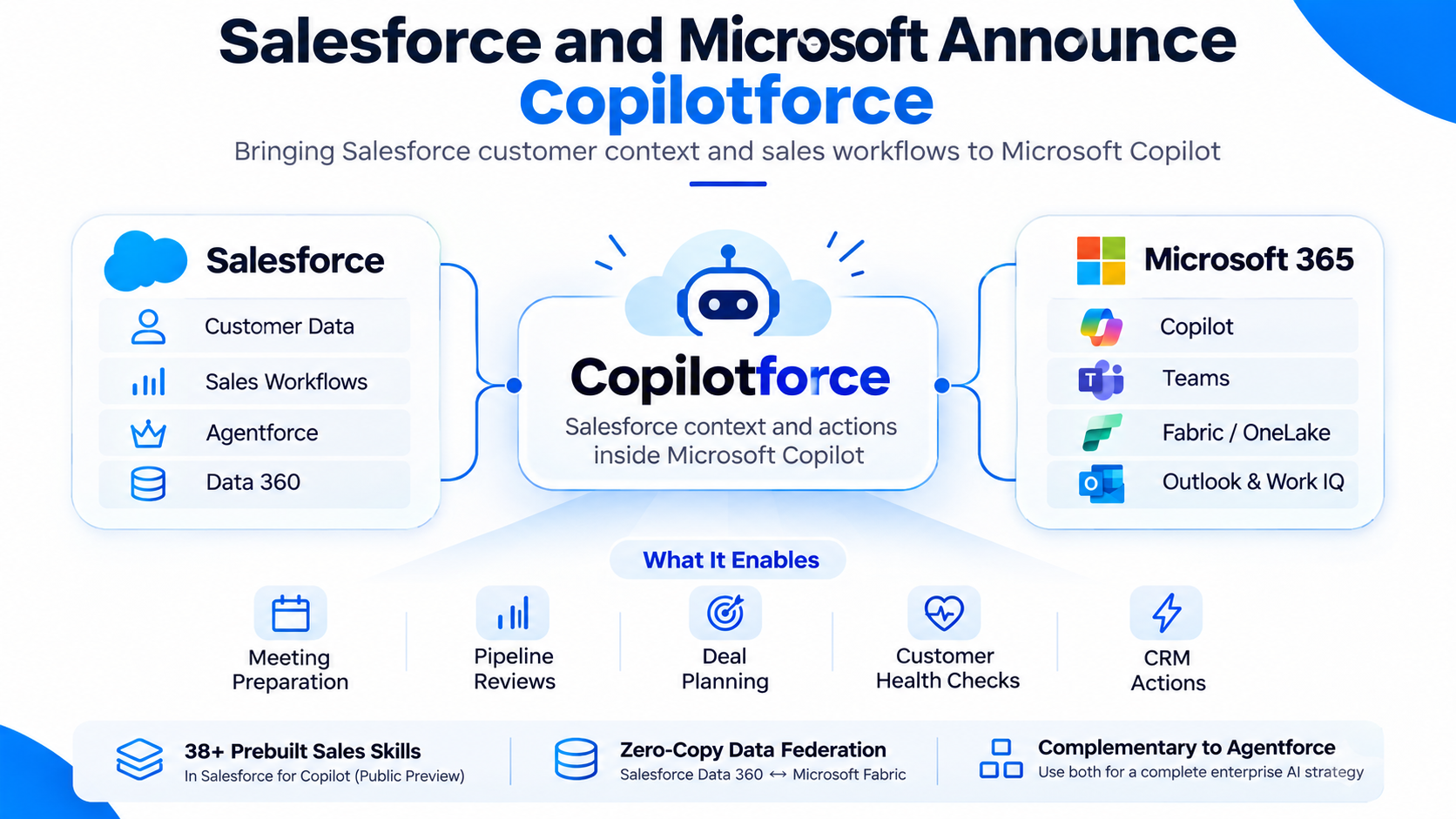
Copilotforce is the name of a Salesforce and Microsoft partnership introducing integrations across Microsoft 365 Copilot, Microsoft Teams, and Microsoft Fabric. It connects Salesforce customer information and supported business actions with Microsoft's productivity and data ecosystem. Read more: Salesforce Agentforce. Read more: Salesforce Data 360. Read more: native platform for building and operating AI agents.
It is not a replacement for Salesforce Agentforce. Agentforce remains Salesforce's native platform for building and operating AI agents. Copilotforce extends Salesforce capabilities into Microsoft environments through integrations such as Salesforce in Copilot and Sales Cloud in Teams.
The announcement includes four important capabilities:
Salesforce in Copilot, a public-preview plugin with more than 38 prebuilt sales skills.
Sales Cloud in Teams, currently in enterprise pilot.
Bidirectional zero-copy integration between Salesforce Data 360 and Microsoft Fabric.
Enterprise permissions, governance, and supported CRM actions across both ecosystems.
These capabilities have different availability stages. Founders should not interpret the announcement as meaning every integration is generally available.
Why This Announcement Matters Now
Enterprise AI has moved beyond generating text. Organizations increasingly want assistants that understand business context, retrieve trusted information, recommend decisions, and complete authorized tasks. Read more: assistants that understand business context.
However, the relevant information rarely exists in one application. Customer records may live in Salesforce, while the actual conversations influencing a deal happen through email, meetings, and shared documents.
Traditional integration approaches often require custom APIs, data synchronization, duplicated storage, and additional user interfaces. Each integration introduces maintenance and governance responsibilities.
Copilotforce attempts to reduce this fragmentation by connecting CRM context with Microsoft Work IQ, which draws relevant context from Teams, Outlook, SharePoint, and OneDrive.
Consider a sales opportunity marked as healthy in Salesforce. An Outlook conversation might reveal an unresolved procurement concern, while a Teams discussion identifies a delayed implementation dependency. A properly authorized assistant that can access both sources could present a more useful picture than either application alone.
That does not guarantee better forecasts or higher revenue. Those outcomes still depend on data quality, adoption, and workflow execution. But it changes what information an employee can bring together when making a decision.
How Copilotforce Works: The Technical Architecture
At a high level, the architecture combines Microsoft Copilot as a user-facing experience, Microsoft Work IQ for relevant productivity context, and authenticated Salesforce access for CRM information and supported actions.
Salesforce describes AIforce as an interface layer that makes Salesforce capabilities accessible in external AI environments. The integration also uses authenticated Salesforce Model Context Protocol access.
A simplified conceptual flow is:

This diagram illustrates the logical responsibilities rather than a complete published internal deployment topology.
The important architectural distinction is that accessing information and modifying records are different operations. Salesforce permissions govern accessible customer data and supported actions. Microsoft applies its enterprise compliance controls to productivity content. Supported CRM writeback requires explicit user confirmation and remains subject to Salesforce validation rules.
For technical founders, the lesson is straightforward: an agent's ability to reason about data must not be confused with permission to modify that data.
38+ Sales Skills: From Information Retrieval to Action
The Salesforce in Copilot public preview includes more than 38 prebuilt sales skills. These cover activities such as pipeline reviews, close planning, customer health analysis, renewal risk, and meeting follow-up.
Pipeline Review and Deal Planning
A seller can use Salesforce opportunity information together with relevant work context to identify deals requiring attention. Copilot can help prepare plans and supporting material in familiar Microsoft applications.
Customer Meeting Preparation
Meeting preparation can combine account history with relevant discussions and documents. Rather than manually reconstructing the customer relationship, the employee receives a briefing grounded in accessible sources.
Deal Health and Renewal Risk
Customer concerns expressed outside CRM can be important indicators of risk. Combining those signals with Salesforce records may help teams recognize problems earlier, provided the information is current and correctly interpreted.
Follow-Up and CRM Actions
Supported workflows can draft follow-ups, summarize meetings, and propose CRM updates. The distinction between a proposed update and a committed writeback matters: supported writeback actions require confirmation.
For founders, these examples demonstrate that valuable AI products do not always require unrestricted autonomy. A controlled workflow that prepares a useful recommendation and asks for confirmation may be a better product than an agent that independently changes customer records.
Sales Cloud in Microsoft Teams
Sales Cloud in Teams brings Salesforce customer context and sales workflows into the collaboration environment. As of the November 2026 announcement, the integration is in pilot with enterprise customers.
Planned and demonstrated capabilities include pipeline and quota visibility, deal notifications, briefing materials, secure record sharing, and supported opportunity updates through interactive experiences.
Agentforce Coworker capabilities are also part of the broader Teams experience, supporting delegation and business actions.
The business implication is significant. Collaboration software can become a place where work is completed rather than merely discussed.
However, founders should evaluate whether embedding CRM actions in chat actually improves completion rates. A workflow that is convenient but creates duplicate notifications or unclear ownership can introduce new problems.
Zero-Copy Data Federation: The Less Visible Opportunity
The Microsoft Fabric integration may be one of the most strategically important parts of the announcement.
Many enterprises already maintain separate customer, financial, operational, and analytical datasets. Moving information between these systems often involves extraction pipelines, synchronization schedules, and duplicated datasets.
Salesforce and Microsoft are introducing bidirectional zero-copy capabilities between Salesforce Data 360 and Microsoft Fabric.
The availability is asymmetric:
Querying supported Microsoft Fabric OneLake data from Salesforce Data 360 is generally available.
Sharing curated Salesforce Data 360 intelligence into Microsoft OneLake is in public preview.
Zero-copy does not mean there is no processing, security boundary, or data governance responsibility. It means supported integrations can access or share data without maintaining a separate duplicated dataset for that use case.
For founders building analytics or AI products, this suggests a valuable design principle: avoid copying enterprise data by default when governed access to an authoritative source can meet the requirement.
Related reading: Vector Databases and Semantic Search with LangChain, which explores a different but complementary challenge: retrieving relevant context for AI applications.
Copilotforce vs. Agentforce: Which One Do You Need?
Copilotforce and Agentforce solve related but distinct problems.
Agentforce is Salesforce's native agent platform. It supports the development and execution of agents within Salesforce and connected channels.
Copilotforce describes the partnership and integrations that expose Salesforce context, sales skills, and supported actions inside Microsoft productivity experiences.
Think of Agentforce as part of the Salesforce-native agent execution ecosystem, while Copilotforce expands where Salesforce capabilities can be accessed.
Organizations may use both. A company could operate Salesforce-native agents for CRM processes while allowing Microsoft Copilot users to access supported Salesforce capabilities from their normal workspace.
Licensing also needs careful evaluation. Salesforce Agentforce usage and Microsoft 365 Copilot access follow different commercial arrangements. Eligibility for specific Copilotforce features can depend on Salesforce editions, Microsoft licensing, permissions, regional availability, and preview participation. Confirm the current terms with both vendors rather than assuming existing subscriptions include every feature.
The Strongest Counterargument: Does This Increase Vendor Lock-In?
There is a legitimate concern that connecting Salesforce and Microsoft more deeply could make organizations increasingly dependent on two large enterprise software vendors.
More integrations do not automatically mean lower costs. Enterprises may face additional licensing, administrative complexity, data access reviews, and change-management requirements.
There is also the risk of building workflows around preview features that later change. The announced integrations are at different maturity levels, and product roadmaps are not guarantees.
These concerns are real. But avoiding integration entirely also has costs: duplicated work, fragmented context, and custom interfaces that employees may not adopt.
The better response is to maintain clear architectural boundaries. Keep authoritative data in the appropriate systems, document integration dependencies, evaluate export and interoperability options, and avoid placing critical business processes on preview-only capabilities without a fallback.
Founders should measure the total cost of ownership, not just the apparent convenience of a single conversational interface.
What Founders Should Do in the Next 90 Days
I would not recommend rebuilding an entire sales organization around Copilotforce immediately. I would recommend a controlled pilot with measurable business outcomes.
Identify one high-friction workflow, such as customer meeting preparation or opportunity follow-up.
Map where the relevant data lives across Salesforce and Microsoft 365.
Confirm licensing, regional availability, user permissions, and preview access.
Define a baseline for time spent, data accuracy, task completion, and user satisfaction.
Test the integration with a small group of authorized employees and representative scenarios.
Require human confirmation for sensitive or consequential CRM updates.
Review logs, access controls, operational costs, and failures before expanding.
Useful pilot metrics include time saved per meeting, percentage of accepted recommendations, accuracy of retrieved account context, frequency of failed actions, and user adoption.
Do not use the number of AI-generated responses as the main success metric. Measure whether employees complete meaningful work more effectively.
For teams designing their own integrations, see Building a Serverless AI API with Cloudflare Workers for a smaller example of separating authentication, validation, model execution, and API delivery.
Where I Land: Enterprise AI Is Becoming a Workflow Layer
My conclusion is that Copilotforce represents a broader shift in enterprise AI architecture. The competitive advantage is increasingly about connecting trustworthy business context to useful actions inside existing employee workflows.
For Salesforce customers already using Microsoft 365, the partnership is worth evaluating because it may reduce the friction between CRM records and everyday sales collaboration.
For founders building AI products, the strategic lesson is even broader. Do not assume that every successful AI product needs a completely new interface. Sometimes the better opportunity is a specialized, governed capability that works inside tools customers already use.
At the same time, distribution alone does not create reliability. Identity, permissions, data freshness, auditability, evaluation, and human approval remain essential.
Copilotforce is promising, but the business case must be demonstrated through real workflows, not announcement-day enthusiasm.
My recommendation: start with one valuable sales workflow, validate the integration, measure outcomes, and scale only when the evidence supports it.
Official sources: Microsoft's Copilotforce announcement and Salesforce's announcement.

AI Automation Engineer & Salesforce Developer
Salesforce developer since June 2018. I build AI agents, n8n workflows and Salesforce integrations, and write up what holds up in real use.
Related posts
 Salesforce
Day 14/15 — Production Architecture: Governance, Monitoring & Error Handling
Take a Salesforce AI assistant to production: who approves tools, what Salesforce logs, how to classify and retry errors, and which limits and costs to plan for.
 Salesforce
Day 13/15 — Headless 360 + Agentic AI Architecture
One assistant, a planner with tools, or several agents? Where Agentforce fits, what the beta Headless 360 MCP Server changes, and native React versus Next.js.
Day 12/15 — Custom MCP Tools + Apex/Flow Business Logic
Publish your own Apex and Flow logic as tools on a custom Salesforce hosted MCP server, so the model calls your business rules instead of inventing them.
Comments
Loading comments...