Calling an LLM From Apex: Where Python Still Wins
Apex makes the HTTP call to an LLM in about twenty lines. Everything that decides whether the feature survives — validation, retrieval, evals, cost — is the part Python still owns.

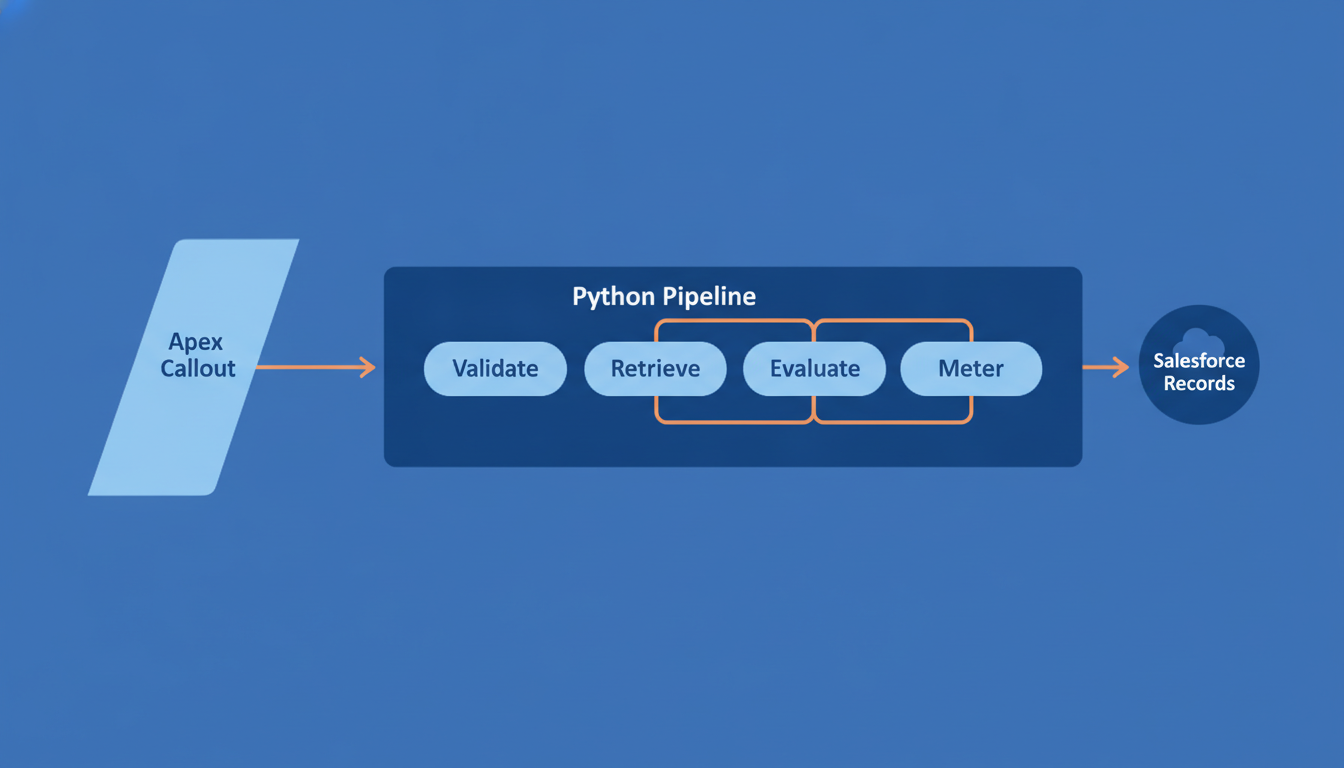
Most "AI in Salesforce" conversations start the same way: the model is just an API, and Apex already knows how to make an HTTP callout. That's true, and it's also a trap. The callout is the smallest piece of the work. The parts that decide whether the feature survives contact with real users — validating what the model sends back, feeding it the right records, tracking cost and latency, proving the answers are actually right — are the parts Apex helps you with least. Knowing where that boundary sits is what stops an "AI in Salesforce" scope from quietly turning into a rewrite.
The callout itself is the easy part

Apex can call an external HTTP service without ceremony. You put the API key and endpoint behind a Named Credential so neither lives in your code, allowlist the endpoint, build an HttpRequest, send it, and deserialise the JSON that comes back. For a one-shot prompt whose output is consumed directly, that pattern is perfectly adequate:
HttpRequest req = new HttpRequest();
req.setEndpoint('callout:LLM_Service/v1/responses');
req.setMethod('POST');
req.setHeader('Content-Type', 'application/json');
req.setBody(JSON.serialize(new Map<String, Object>{
    'model' => 'MODEL_NAME', //
    'input' => prompt,
    'max_output_tokens' => 800
}));
req.setTimeout(120000); //

HttpResponse res = new Http().send(req);
if (res.getStatusCode() != 200) {
    throw new CalloutException(res.getBody());
}
Two things are worth noticing in that snippet. You're blocking a thread for the entire duration of the model's response, and what comes back is a string you now have to trust. Neither is fatal, but neither is where the value is. In practice you don't want this running inside a user's transaction at all — an @future or Queueable job that takes the model call out of the interactive path is a more honest shape, and it gives you somewhere to put retries and backoff.
Five stages the callout doesn't cover
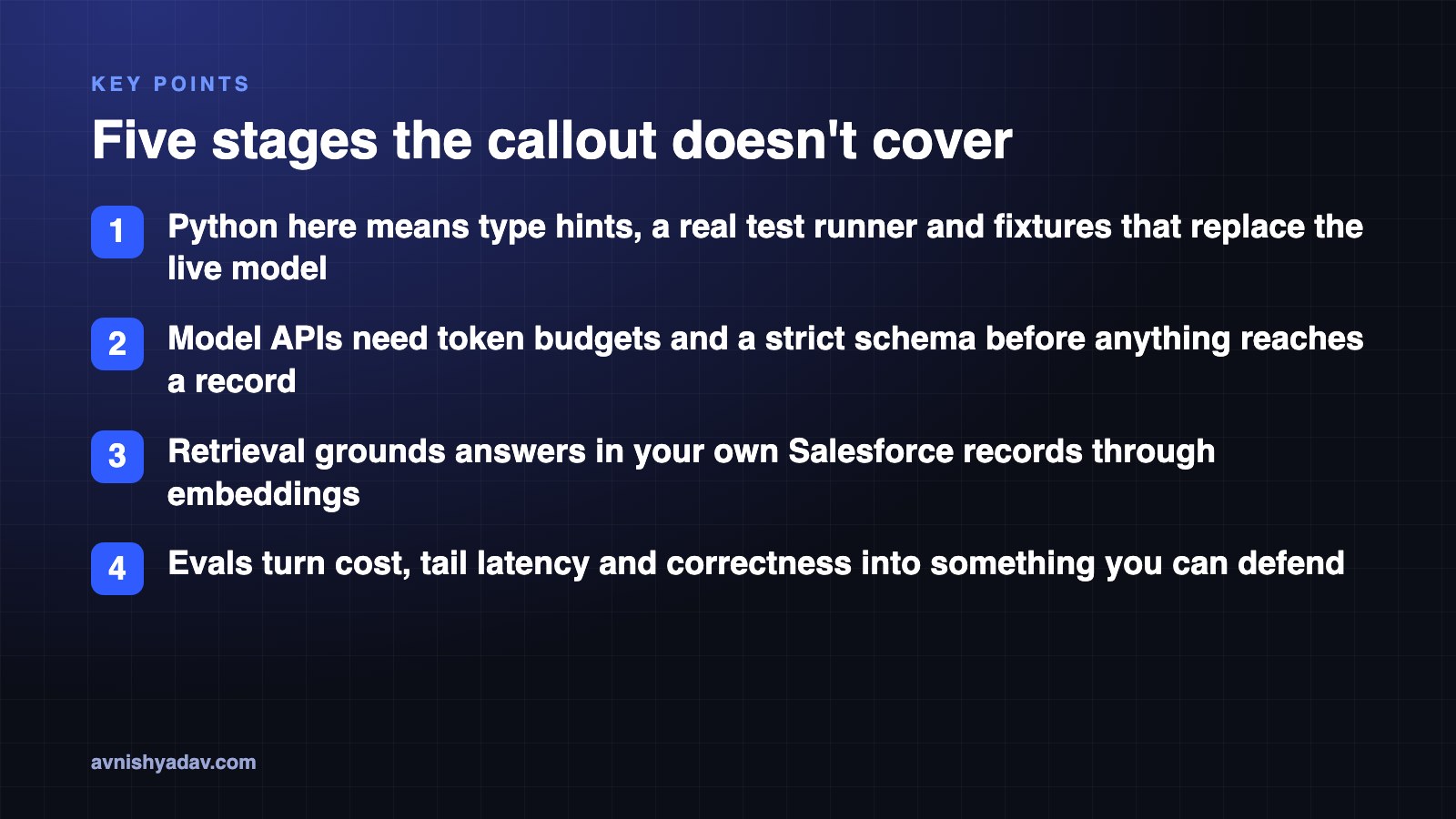
The roadmap I laid out in this week's video frames the move from Salesforce developer to AI engineer as Python plus four more stages. The callout above barely touches any of them.
- Python — but not the syntax. You already model data and ship production logic in Apex. What's missing is typing and tests: type hints for clarity, a real test runner, and fixtures that let you swap the live model for a fake so your suite doesn't cost money to run.
- The model API. Tokens, context limits, and JSON validation. Anything the model returns should pass a strict schema before it reaches an org record, which is the same logic behind structured JSON output with schema injection and retry loops.
- Retrieval. Generating embeddings, storing them in a vector index, and using your own Salesforce records as the corpus that grounds the model in your business context.
- One service, built end to end. A single deployable repository for your AI logic, rather than a collection of scattered scripts and half-finished tutorials.
- Evals. Token cost, tail latency, and verifiable proof that the answers are actually correct and useful.
Step two is where the Apex-only approach starts to strain. Models are good at returning almost-JSON, and Apex's typed deserialisation will throw on the first unexpected field. A validating layer in Python turns that into a clean failure you can retry or repair:
from typing import Literal
from pydantic import BaseModel

class CaseSummary(BaseModel):
    case_id: str
    summary: str
    sentiment: Literal["positive", "neutral", "negative"]

raw = call_model(prompt)  # your provider's SDK call
summary = CaseSummary.model_validate_json(raw)  # raises instead of guessing
You can reproduce a version of this in Apex with careful JSON.deserializeUntyped checks and defensive parsing. You'll write it once, and then again for every new schema, with no built-in retry story and no straightforward way to unit test it without hitting the live endpoint. That's the trade in one line: Apex is fine at making the call, and expensive at owning everything around it.
Retrieval is where your Salesforce data becomes the risk

Embeddings, a vector index, and your own records as the corpus is the pattern most teams land on — setting up vector databases for semantic search covers the mechanics. A common default for a Salesforce developer moving into this stack is pgvector, because it keeps the vector store inside a database you already know how to operate.
The part that's specific to Salesforce — and the part that gets skipped — is sharing. Your retrieval layer has to respect record access, or the model will happily summarise a case the requesting user can't open. That isn't a prompt problem; it's a least-privilege problem. Which means either running retrieval in the user's context, applying your own sharing-aware filters before the query, or deliberately restricting what the index contains in the first place. Whichever you choose, it's a decision you make in the service layer, not in a trigger.
Evals are the work nobody scopes
An eval doesn't have to be a platform. It's a fixed set of prompts with known-good answers, a script that runs them on every change to the prompt or the model, and a record of what came back. Three things are worth tracking from day one: token cost per request for budget control, latency at the tail rather than the average for user experience, and a correctness signal you're willing to defend in a review. When someone asks whether the feature is working, that file is the answer — not a demo.
What I'd do next
Keep Apex thin and deliberate. It triggers the work, it writes the result back to the record, and it stays out of the model's way. Put the orchestration, validation, retrieval and evals in a Python service behind a Named Credential, over your own Salesforce records, in one repo that actually deploys. Then measure cost, latency and correctness before anyone calls it shipped — because that's the difference between a demo and something a team will let near production data.
Get the cheat sheet (PDF)
Calling LLMs from Apex: Where Python Still Wins
All 6 days in this series
- Day 015 Chinese AI Models You Can Download Right Now (Open Weights)
- Day 02RemoveMacAI: remove Apple Intelligence on macOS 27
- Day 03LLMs vs AI agents vs workflows: which one are you building?
- Day 04Apex Governor Limits: Why Query 101 Kills Your Transaction
- Day 05What Is a Token in an LLM? Tokens vs Words, Explained
- Day 06Calling an LLM From Apex: Where Python Still Wins
Related posts
 Salesforce
Apex Governor Limits: Why Query 101 Kills Your Transaction
Sync Apex gets 100 SOQL queries, 150 DML statements, 10 seconds of CPU and 6 MB of heap per transaction. Cross the line and the whole transaction rolls back.
What Is a Token in an LLM? Tokens vs Words, Explained
The model never reads your words — a tokenizer cuts text into chunks first. Here's how tokens drive your API bill, context window and rate limits.
 Salesforce
Day 15/15 — Build a Complete Headless Salesforce AI Assistant
The capstone: a Next.js assistant that signs in with PKCE, lets Claude call Salesforce hosted MCP servers as the user, and asks before every write.
Comments
Loading comments...